Comfort by Mitsubishi Electric
- 4.3
- Rating
- 50.00K
- Installs
- Free
- Price

 Analysis by App-foxy
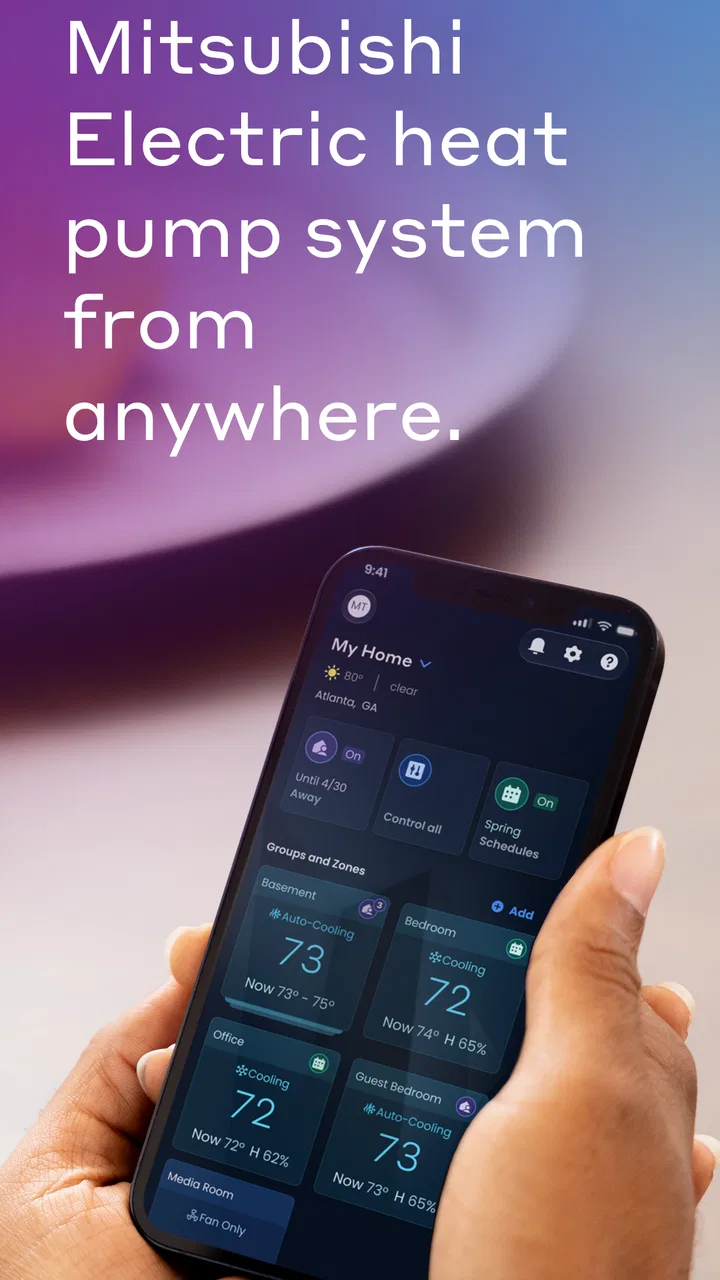
Controlling heating and cooling from a phone sounds like a small convenience until you are on the way home, standing outside in bad weather, or trying to avoid walking through the house to check whether the system is still running. Comfort by Mitsubishi Electric is built for that narrow but useful purpose: it lets a smartphone or tablet communicate with compatible Mitsubishi Electric HVAC equipment. I see it as a practical remote-control companion rather than a complete smart-home platform, and that distinction matters when deciding whether it belongs on your device.
In my experience, the app makes the most sense for people who already have a Mitsubishi Electric HVAC system and want a more convenient way to manage it. It is free, aimed at Everyone, and comes from Mitsubishi Electric US, so the appeal is straightforward: use the device you already carry instead of relying only on a wall controller. The app has been available since Aug 25, 2015, and its current version is 3.4.0, which gives it a long product history even though the day-to-day experience remains focused on one job.
How Comfort by Mitsubishi Electric fits into everyday HVAC control
The first thing I noticed is that this is not an app I would install casually just to explore. Its value depends heavily on the HVAC equipment in your home and whether that equipment can work with the app. For an owner of a compatible Mitsubishi Electric system, the phone becomes an extra control point. For someone with another brand, or someone looking for a universal climate-control app, this is the wrong starting point.
You May Also Like

 AccuWeather: Weather Radar
AccuWeather Review: A Quick, Clear Forecast for Everyday Decisions
For everyday plans, the best forecast is the one you can understand quickly. AccuWeather makes rain timing, radar, and local conditions easy to act on, with a few trade-offs.

 Hill Climb Racing
Why Hill Climb Racing Still Turns Crashes Into One More Run
A tiny car, a bumpy hill and one more upgrade: Hill Climb Racing keeps resurfacing because its simple chaos makes every near-miss feel personal.

 AliExpress - Shopping App
AliExpress Makes Global Shopping Feel Personal, but Shoppers Bear the Risk
AliExpress turns a global marketplace into a pocket-sized discovery engine. Its reach is useful, its shopping loop compelling, and its trade-offs easy to miss.

 Lords Mobile: Kingdom Wars
Lords Mobile Is a Kingdom-Building Routine, Not a Quick Match
A case-by-case verdict on the building, battles, device demands, and social commitments that make Lords Mobile rewarding for some players and exhausting for others.

 PDF Scanner app - TapScanner
TapScanner Makes Paperwork Easier to Capture, Check, and Share
TapScanner makes scanning with a phone feel less like a rescue operation and more like a dependable step in getting work done. Its capture tools are useful, though not flawless.

 Block Blast!
 Shows How Much a Puzzle Game Can Leave Out
A quiet grid game shows why puzzle players increasingly value instant clarity, repeatable skill and low-pressure play—and where the genre still needs to catch up.
More From Our News Desk
View All News


That focused approach is both the app’s strength and its main limitation. It avoids trying to become a general dashboard for lights, cameras, locks, and appliances. Instead, it stays centered on comfort inside the home. That can make the experience easier to understand, but it also means the app cannot replace a broader smart-home solution if you want several brands managed from one place.
A realistic use case is a home office. I can imagine leaving for an appointment while the HVAC is still running, checking the system from a phone, and adjusting it before returning. Another useful moment is arriving home after the house has been empty for hours. Rather than leaving the system running continuously just to guarantee a comfortable room, remote access can make it easier to manage the timing around real life. The benefit is not dramatic every time; it is the removal of small interruptions that add up over a week.
There is also a useful distinction between remote access and automation. A remote-control app lets me make a decision when I need to make one. It does not automatically understand my schedule, the weather, or whether a room is occupied unless those capabilities are explicitly supported by the connected HVAC setup. I would therefore approach Comfort by Mitsubishi Electric as a hands-on control tool, not assume that installing it creates a fully autonomous climate system.
The current experience is best for Mitsubishi owners
The app’s audience is unusually clear. If Mitsubishi Electric equipment is already installed in your home, the app may add convenience without asking you to replace the system. If you are comparing HVAC brands before buying, the app should be considered as one part of the ownership experience, not as a reason by itself to choose a particular unit.
That difference is important because the phone interface cannot compensate for an unsuitable installation or an HVAC system that does not support the necessary connection. Before spending time setting it up, I would identify the exact indoor and outdoor equipment involved and check compatibility through the appropriate Mitsubishi Electric documentation or installer. That is a more reliable first step than assuming every Mitsubishi Electric product works in the same way.
The app has an average rating of 3.8 from around 2.5 thousand ratings, with roughly 1.3 thousand written reviews. I read that as a sign of a useful but not universally frictionless product. A rating in that range often reflects the reality of hardware-dependent apps: one person may find the remote control indispensable, while another may be blocked by equipment compatibility, connection issues, or an older setup.
Its reach is also modest compared with mass-market social or entertainment apps, with over 50 thousand installs. That is not a judgment against it. A specialized HVAC controller naturally serves a smaller audience. In fact, the limited audience reinforces the point that this is a product for a particular ownership situation, not a general-purpose home app that everyone should download.
What the version history tells existing users
The current version, 3.4.0, shows that the application has continued beyond its original release. That is useful context for existing users: the app is not simply an abandoned utility left unchanged since its first appearance. At the same time, a version number alone does not prove that every older phone, HVAC configuration, or network arrangement will behave identically. I would still treat the actual equipment and device combination as the deciding factor.
For someone who has used an earlier version, the practical question is less about the number itself and more about whether the app remains dependable in the situations that matter. Can I reach the system when I am away? Does the connection recover after a router restart? Is the control layout understandable when I am in a hurry? Those are the tests that determine whether an update improves ownership in a meaningful way.
I would also avoid changing several parts of a home setup at once. If you update the app, replace the phone, and alter the home network on the same day, troubleshooting becomes unnecessarily difficult. A better workflow is to update the app, confirm local control, then test remote access from a mobile connection. This simple separation helps identify whether a problem belongs to the app, the household network, or the HVAC connection.
Another practical tip is to keep the physical controller available. A phone is convenient, but it depends on battery power, the device being nearby, and a working connection. The wall controller or standard system controls remain valuable as a fallback, especially for guests, children, or anyone who does not want to use a phone for basic temperature changes. Remote access works best as an additional control path, not the only one.
Small workflows that make the app more useful
The most useful habit is to treat the app as a check-in tool rather than repeatedly opening it without a purpose. Before leaving home, I would confirm the system’s state and make one deliberate adjustment if needed. Before returning, I would use the same short routine. This reduces the temptation to keep changing settings from a distance and makes it easier to notice whether the system is responding normally.
For a second home or a room used irregularly, remote control can be more valuable than it is in a constantly occupied house. A person who visits a property only on certain days may appreciate being able to prepare the space before arrival. The trade-off is that remote control should not be confused with remote inspection. A phone command cannot tell me everything about airflow, unusual sounds, blocked filters, or a mechanical fault. I would still arrange normal maintenance and physical checks where appropriate.
Families can also benefit from agreeing on a simple control routine. If one person changes the system from the wall controller while another uses the phone, the resulting settings may be confusing. I would decide who normally manages remote changes and use clear expectations about when the app is appropriate. This is not a technical feature, but it prevents a common household problem: several people making reasonable adjustments that work against one another.
When troubleshooting, I would start with the least complicated explanation. First check whether the phone has a working connection, then whether the home network is operating, and finally whether the HVAC equipment responds through its usual controls. If the system itself is not responding locally, the app is unlikely to be the real cause. This order saves time and avoids treating a remote-control problem as if it were automatically a software defect.
The app is also more suitable for intentional changes than for precision planning. If your needs involve detailed room-by-room schedules, occupancy rules, energy reporting, or integrations across many manufacturers, I would compare it with a broader home-automation setup. Comfort by Mitsubishi Electric may still be useful alongside that system, but I would not expect one focused HVAC app to provide every layer of home management.
Where the focused design helps, and where it falls short
Compared with using only a physical remote or wall controller, the app adds convenience at a distance. That is its clearest advantage. I do not need to be in the same room to make a change, and I can use a familiar touchscreen instead of learning another dedicated control interface. For people who often forget to adjust the HVAC before leaving, that extra access can make the system feel more manageable.
Compared with a universal smart-home app, the trade-off is breadth. A universal platform may bring climate, lighting, security, and other devices together, but it can also introduce another layer of setup and may not expose every Mitsubishi-specific control in the same way. The Mitsubishi-focused route is more sensible when the HVAC system is the priority and the rest of the home does not need to be managed from one screen.
Compared with a simple thermostat, the experience may also feel different depending on the HVAC installation. A traditional thermostat often presents one familiar control model, while a Mitsubishi Electric system can involve equipment-specific behavior and settings. I would not judge the app solely by whether it resembles a thermostat application. Its role is to extend control of a Mitsubishi Electric HVAC system, and the quality of that experience is tied to the system it is paired with.
The main friction is the dependency chain. The phone, app, home network, remote connection, and HVAC hardware all need to cooperate. If any link is unreliable, the convenience becomes less convincing. That does not make the app useless, but it does mean I would be cautious about depending on it for urgent situations or for a promise that the home will always be at a particular temperature when I arrive.
Privacy and device access are also worth considering in ordinary terms. An HVAC controller is connected to a home environment, so I would install it only from the normal official app channel and keep the account and phone secured. I would not share access casually, especially in a rental, shared home, or property that changes occupants. The app’s Everyone age rating makes it broadly accessible, but accessibility does not remove the need for sensible account habits.
Who should use it and who should look elsewhere
I would recommend it to a Mitsubishi Electric HVAC owner who wants convenient control from a phone or tablet and is comfortable checking compatibility before setup. It is especially appealing for people who travel, manage a second property, work irregular hours, or simply want to check the system without walking to the controller.
I would be more cautious for someone who expects a complete smart-home hub. If your priority is one application for several brands, detailed automation, or a large collection of connected devices, a broader platform may be a better center of your setup. You might still use this app for Mitsubishi-specific control, but it should not be chosen with expectations it was not designed to meet.
I would also skip it if you do not own compatible Mitsubishi Electric equipment. The free price removes a financial barrier, but it does not remove the hardware requirement. Installing a free app is not useful if the system in the home cannot communicate with it. In that situation, the manufacturer’s compatibility information and the installer’s advice are more important than the app’s download cost.
For older phones, the minimum operating system is Android 7.0. That makes the app available to a wide range of Android devices, although practical performance can still depend on the phone, its network connection, and the surrounding HVAC setup. I would keep the phone’s software reasonably current where possible and avoid judging the app on a device that is already struggling with other connected-home applications.
What I would watch during continued use
For current users, I would pay attention to reliability after ordinary changes: a router replacement, a new phone, a system power interruption, or an app update. These events reveal whether the connection is easy to restore. I would also note how clearly the app communicates when a command has been sent, when the equipment is unreachable, and when a setting has actually taken effect. Clear feedback is more valuable than a crowded screen.
I would watch future development for improvements that reduce setup and recovery friction rather than simply adding more controls. Better compatibility guidance, clearer connection status, and a smoother return after network changes would have a direct effect on everyday trust. Those are expectations about what would help users, not claims about features already present.
Existing owners should also judge updates by their own routine. If the app already handles the few actions you need, there may be no reason to change your habits after every release. If remote access has been inconsistent, an update is worth testing, but I would verify the system locally and remotely afterward instead of assuming that installation alone solved the issue.
After using it as a focused HVAC companion, my opinion is positive but measured. Comfort by Mitsubishi Electric does one specific thing that can be genuinely helpful: it gives compatible Mitsubishi Electric owners another way to manage home climate from a smartphone or tablet. The free app, broad age rating, long availability, and current 3.4.0 version make it an easy option to consider when the hardware match is right.
Still, I would not describe it as a universal answer for connected homes. Its usefulness depends on compatibility and on the reliability of the connection between the phone, network, and HVAC equipment. I would keep the normal controller as a backup, confirm the exact system before installing, and choose a broader smart-home alternative if automation across many device types is the real goal. For the right Mitsubishi Electric household, though, the app earns its place by turning occasional HVAC checks into a quick phone-based routine, and that is a practical benefit I would recommend to a friend.
FAQs for Comfort by Mitsubishi Electric
01What features does the Comfort by Mitsubishi Electric app offer?
The Comfort by Mitsubishi Electric app provides users with a comprehensive control system for their HVAC units. It allows remote operation, scheduling, and monitoring of your heating and cooling systems. The app also offers energy usage insights and notifications for maintenance alerts, ensuring optimal performance and efficiency.
02Is the Comfort app compatible with all Mitsubishi Electric HVAC systems?
The app is compatible with most Mitsubishi Electric HVAC systems, particularly the newer models. However, it's crucial to verify compatibility with your specific unit by checking the model number on the app's official compatibility list or by contacting Mitsubishi Electric support for confirmation.
03How user-friendly is the Comfort app for new users?
The Comfort app is designed with user-friendliness in mind, featuring an intuitive interface that simplifies navigation. It includes step-by-step guides and tutorials to help new users set up and manage their systems effortlessly. The app prioritizes ease of use to ensure that users can maximize its features with minimal effort.
04Can I integrate the Comfort app with smart home systems?
Yes, the Comfort app offers integration with popular smart home systems such as Google Home and Amazon Alexa. This allows users to control their HVAC systems using voice commands and create automated routines for enhanced convenience and efficiency, making it a valuable addition to any smart home setup.
05What security measures are in place to protect my data on the Comfort app?
The Comfort app employs robust security protocols to safeguard your data, including encryption and secure authentication processes. Mitsubishi Electric prioritizes user privacy and regularly updates the app to address potential vulnerabilities, ensuring that your personal and usage data remains protected at all times.
Pros
- User-friendly interface that's easy to navigate.
- Energy-saving features reduce electricity bills.
- Remote control via smartphone app.
- Customizable settings for personalized comfort.
- Reliable performance with minimal maintenance.
Cons
- Initial setup can be time-consuming.
- Limited compatibility with older devices.
- Occasional connectivity issues reported.
- App updates can be infrequent.
- Requires a stable internet connection.

Comfort by Mitsubishi Electric
Gallery